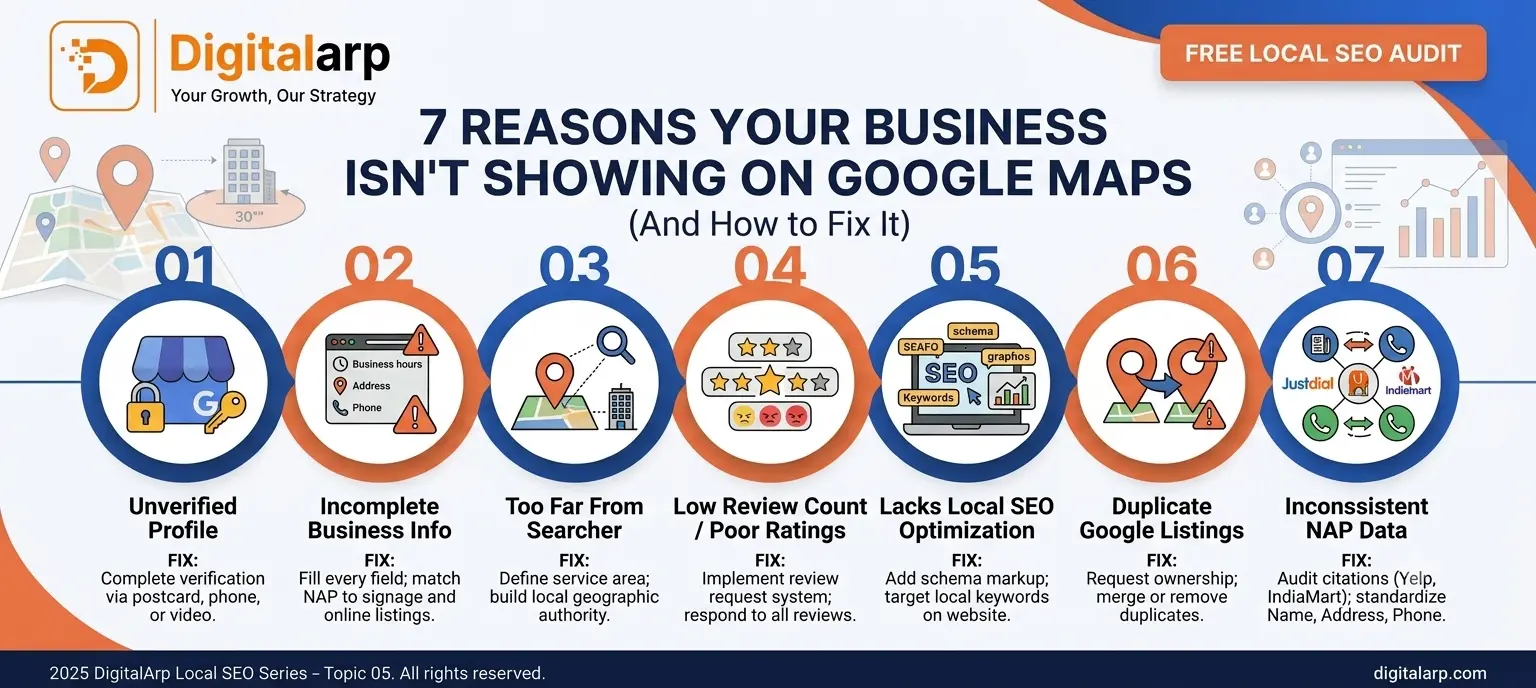

01. Your Google Business Profile Is Unverified
The most common culprit is an unverified Google Business Profile (GBP). Without verification, Google won't display your listing in local search results or on Google Maps. Many business owners create a profile but never complete the verification step and wonder why they're invisible.
Log into your Google Business Profile dashboard at business.google.com. If your listing shows 'Verify Now,' complete the process via postcard, phone, email, or video verification. Once verified, your business becomes eligible to appear in Google Maps and the local 3-pack.
02. Incomplete or Inaccurate Business Information
Google rewards completeness. If your business name, address, phone number (NAP), hours, website, or category are missing or inconsistent, your ranking drops significantly. Inaccurate information also confuses potential customers and reduces trust both with users and Google's algorithm.
Audit every field in your GBP: business name (match it exactly to your signage), primary and secondary categories, phone number, website URL, business hours (including holidays), and a detailed business description using relevant local SEO keywords. Consistency is key—your NAP must match across all online directories.
03. You're Too Far From the Searcher's Location
Google Maps results are heavily influenced by proximity. If a user searches for 'digital marketing agency near me' and your business is far from their location, you'll be outranked by closer competitors—even if your profile is stronger. This is especially impactful for businesses serving hyper-local areas.
Define your service area clearly in your GBP settings. Create location-specific landing pages on your website targeting neighborhoods or districts you serve. Build local citations and earn backlinks from locally relevant websites to strengthen your geographic authority.
04. Low Review Count or Poor Ratings
Reviews are a powerful local SEO ranking signal. Google Maps favors businesses with more reviews, higher ratings, and frequent recent activity. A listing with 2 reviews and a 3.1-star rating will almost always lose to a competitor with 50 reviews and 4.8 stars—regardless of other factors.
Build a systematic review generation process: send follow-up emails or SMS after every purchase, add a QR code to receipts linking to your Google review page, and train your team to ask satisfied customers for feedback. Always respond to every review—positive or negative—to signal engagement to Google.
05. Your Website Lacks Local SEO Optimization
Google Maps rankings aren't just about your GBP—your website's local SEO signals matter enormously. If your site lacks location-based keywords, doesn't have schema markup, or has poor domain authority, your Maps listing will struggle to rank in competitive searches.
Add Local Business schema markup to your website's homepage. Include your city and service keywords naturally in your title tags, H1s, and meta descriptions. Create a dedicated 'Contact Us' page with an embedded Google Map. Build your domain authority through quality local backlinks from chambers of commerce, local blogs, and industry directories.
06. Duplicate Listings or Suspended Profile
Duplicate Google Business Profiles confuse Google's algorithm and split your ranking signals, resulting in neither listing performing well. Worse, if Google detects policy violations (keyword stuffing in your business name, a virtual office address, or spam tactics), your listing can be suspended and disappear entirely from Maps.
Search for your business on Google Maps and check for duplicate listings. Request ownership of duplicates and merge or remove them. If your listing is suspended, audit your profile against Google's guidelines, correct any violations, and submit a reinstatement request through the GBP support portal.
07. No Local Citations or Inconsistent NAP Data
Local citations—mentions of your business name, address, and phone number on directories like Justdial, Sulekha, IndiaMart, Yelp, and industry sites—validate your business's legitimacy for Google. Inconsistent NAP data across these platforms sends conflicting signals that hurt your Maps ranking.
Audit your existing citations using tools like Moz Local or BrightLocal. Correct any inconsistencies and submit your business to the top 20-30 relevant local directories. Ensure your business name, address (including pin code), and phone number are exactly identical everywhere they appear online.
-
Quick-Win Local SEO Checklist
- Complete every field (name, address, hours, website, description, photos)
- Choose the most accurate primary & secondary categories
- Collect 10+ genuine Google reviews this month
- Add LocalBusiness schema markup to your website
- Audit and fix NAP consistency across all directories
- Define and update your service area in GBP
- Check for and remove duplicate listings
- Build 5 new local citations this week
- Respond to every existing review within 24 hours
Conclusion
Showing up on Google Maps isn't luck—it's the result of deliberate, consistent local SEO work. By addressing these 7 common issues—from verifying your Google Business Profile to building authoritative local citations—you give your business the best chance of appearing right when customers are searching for what you offer. Local search is one of the highest-intent marketing channels available. Don't leave that traffic on the table.
■ Ready to Dominate Google Maps?
DigitalArp's local SEO experts audit your Google Business Profile, fix ranking issues, and build a strategy that gets your business found — fast.